Symantec VIP Access Authenticator – Setup and Guide
Symantec VIP Access: How to Set It Up, Use It, and Fix It When It Breaks
Symantec VIP Access is a two-factor authentication app required by certain employers and financial institutions — most notably Walmart — to verify your identity at login. If you’ve been told to set it up and aren’t sure where to start, or if it suddenly stopped working, this guide covers what you actually need to know.
What Symantec VIP Access Does
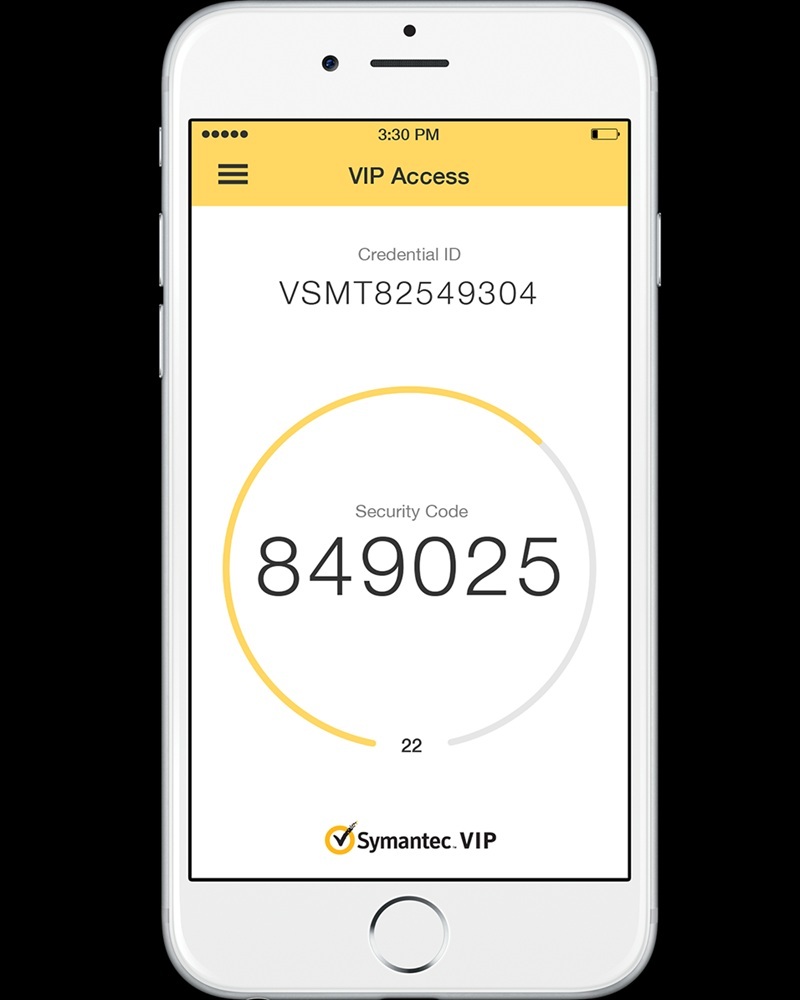
Once installed, the app generates a six-digit security code that refreshes every 30 seconds. When you log into a protected system, you enter your username and password first, then open the app and enter the current code. The code is calculated locally on your phone — no internet connection needed to generate it.
The app also shows a Credential ID, which is a unique identifier that usually starts with “SYMC.” You only use this during initial setup. After that, you just need the rotating six-digit code each time you log in.
Some setups also support push approval — a notification appears on your phone and you tap Approve instead of typing a code. Whether your employer uses that option depends on how their system is configured.
How to Set Up Symantec VIP Access
Download the app from the official app store on your device — Google Play for Android, App Store for iOS. Don’t download it from anywhere else.
When you open the app, your Credential ID is generated automatically. Then go to the security or two-step verification settings for the service you’re trying to protect, choose the authenticator app option, and enter your Credential ID along with the current six-digit code when prompted. Once confirmed, the device is linked and you’re set.
Important: Never delete the app without first disabling 2FA on your accounts. Reinstalling creates a brand new Credential ID, and your old one is gone permanently. Any accounts linked to the old ID will stop working immediately.
Setting Up Symantec VIP Access for Walmart (wmlink/2step)
Walmart associates use a system called Two-Step Verification (2SV) to access internal tools like schedules, paystubs, and the OneWalmart portal from outside the store network. Symantec VIP Access is the required app for this — standard authenticator apps like Google Authenticator won’t work here.
Setup must be completed on-site, on a work computer or Walmart Wi-Fi, while you’re clocked in. You can’t finish this from home.
Step 1. While at your store, go to wmlink/2step or wmlink/2sv on a work computer.
Step 2. Select the Symantec VIP app option as your verification method.
Step 3. Enter your Credential ID (found at the top of the app) and the current six-digit code.
Step 4. Complete the confirmation. Once done, you can log in from home using the app for verification.
If you skip on-site setup or rush through it, remote login won’t work later. That’s the most common reason Walmart associates get locked out.
Moving Symantec VIP Access to a New Phone
This works differently from most authenticator apps. Symantec VIP has a Migrate Credential feature, but you need both phones present at the same time to use it.
On your old phone, open the app menu and find the Migrate Credential option. It will generate a QR code. On your new phone, install the app and scan that QR code during setup. Your Credential ID transfers over to the new device.
Do this before you reset, trade in, or sell your old phone. If the old device is already gone, there’s no way to self-serve the migration. You’ll need to contact your company’s IT help desk or, for Walmart, call Field Support at 479-273-4357. They can delete the old device registration and let you re-enroll from a work terminal.
Fixing the Most Common Problems
The code is being rejected
Almost always a time sync issue. The codes are time-based, so if your phone’s clock is off even slightly, the math won’t match the server’s. Go into the app settings, find the Time Correction or Sync option, and run a sync. That fixes it most of the time.
If your clock is set to automatic and the codes still fail, check that you’re entering the code for the right account — especially if you have multiple entries in the app.
Credential ID mismatch error
This usually means the ID on your phone doesn’t match what’s registered in the system. It happens most often after someone reinstalled the app, which creates a new ID. You’ll need to go back to a work computer and update the registered ID in the portal.
You switched phones and now can’t log in
Your old Credential ID is tied to your old device. The new phone has a different ID, and the system doesn’t know about it yet. If you still have the old phone, use the Migrate feature. If you don’t, contact your help desk — for Walmart associates, that’s 479-273-4357 for field associates or 479-273-8866 for home office.
Push notifications aren’t coming through
Check that notifications are enabled for the VIP app in your phone’s system settings. Also confirm your phone has an active internet connection — push notifications require it, even though code generation doesn’t.
The app won’t open or crashes immediately
Restart your phone first. If that doesn’t help, check for an app update. Symantec VIP may also refuse to run on rooted or jailbroken devices, since a modified operating system could expose the security tokens the app is designed to protect.
Support Contacts
- Walmart Field Support (2SV issues): 479-273-4357
- Walmart Home Office Support: 479-273-8866
- Broadcom/Symantec Support (North America): 1-800-225-5224
For any issue involving your Walmart account specifically, call Walmart support first. Broadcom handles the app itself, but they can’t access or reset your Walmart 2SV profile.
The Things Worth Remembering
Symantec VIP Access is straightforward once it’s running. The problems almost always happen at the same two moments: initial setup and phone changes. Take setup seriously the first time, especially if you’re a Walmart associate — it genuinely has to be done on-site. And migrate your credential before your old phone is gone, not after.
The app doesn’t need internet to generate codes, doesn’t track your location, and is free to download. It’s doing one job — making sure only you can log in — and it does it well when it’s configured correctly.